Sessions
Hermes Agent는 모든 conversation을 session으로 자동 저장합니다. session 덕분에 이전 대화를 재개하고, 과거 대화를 검색하며, 전체 conversation history를 관리할 수 있습니다.
How Sessions Work
CLI, Telegram, Discord, Slack, WhatsApp, Signal, Matrix, Teams 등 어떤 messaging platform에서 시작한 conversation이든 full message history가 있는 session으로 저장됩니다. session은 두 가지 보완 system에서 추적됩니다.
- SQLite database (
~/.hermes/state.db) - FTS5 full-text search가 가능한 structured session metadata - JSONL transcripts (
~/.hermes/sessions/) - tool calls를 포함한 raw conversation transcripts(gateway)
SQLite database가 저장하는 항목:
- Session ID, source platform, user ID
- Session title - unique하고 사람이 읽기 쉬운 이름
- Model name and configuration
- System prompt snapshot
- Full message history(role, content, tool calls, tool results)
- Token counts(input/output)
- Timestamps(
started_at,ended_at) - Parent session ID(compression-triggered session splitting용)
What Counts Toward Context
Hermes는 conversation을 재개하기 위해 session history를 저장하지만, 지금까지 처리한 모든 byte를 매 turn model에 다시 보내지는 않습니다. 각 turn에서 model이 보는 것은 선택된 system prompt, 현재 conversation window, 그리고 Hermes가 그 turn에 명시적으로 주입한 content입니다.
media attachment는 turn-scoped input으로 처리됩니다.
- image는 다음 model call에 native attachment로 붙거나, active model이 native vision을 지원하지 않을 때 text description으로 pre-analyze됩니다.
- audio는 speech-to-text가 설정되어 있으면 text로 transcribe됩니다.
- text document는 extracted text가 포함될 수 있습니다. 그 외 document type은 보통 saved local path와 짧은 note로 표현됩니다.
- attachment path와 extracted/derived text는 transcript에 나타날 수 있지만 raw image, audio, binary file bytes가 future prompt에 반복 copy되지는 않습니다.
예를 들어 사용자가 image를 보내고 Hermes에게 meme을 만들라고 요청하면, Hermes는 vision으로 image를 한 번 inspect하고 image-processing script를 실행할 수 있습니다. 이후 turn은 원본 JPEG를 자동으로 context에 들고 다니지 않습니다. conversation에 기록된 user request, 짧은 image description, local cache path, final assistant response 같은 내용만 유지됩니다.
context growth의 가장 흔한 원인은 media file 자체가 아니라 verbose text입니다. pasted transcripts, full logs, large tool outputs, long diffs, repeated status reports, detailed proof dumps가 여기에 해당합니다. 큰 artifact를 chat에 그대로 복사하기보다 summary, file path, focused excerpt, tool-backed lookup을 선호하세요.
session이 길어졌다면 /compress를 사용하고, 완전히 새 thread가 필요하면 /new를 사용하세요. hermes sessions prune은 storage에서 오래된 ended session을 삭제하고 싶을 때만 사용합니다. compression은 active context를 줄이는 기능이며 privacy delete가 아닙니다.
Session Sources
각 session은 source platform tag를 가집니다.
| Source | Description |
|---|---|
cli | Interactive CLI (hermes or hermes chat) |
telegram | Telegram messenger |
discord | Discord server/DM |
slack | Slack workspace |
whatsapp | WhatsApp messenger |
signal | Signal messenger |
matrix | Matrix rooms and DMs |
mattermost | Mattermost channels |
email | Email (IMAP/SMTP) |
sms | SMS via Twilio |
dingtalk | DingTalk messenger |
feishu | Feishu/Lark messenger |
wecom | WeCom (WeChat Work) |
weixin | Weixin (personal WeChat) |
bluebubbles | Apple iMessage via BlueBubbles macOS server |
qqbot | QQ Bot (Tencent QQ) via Official API v2 |
homeassistant | Home Assistant conversation |
webhook | Incoming webhooks |
api-server | API server requests |
acp | ACP editor integration |
cron | Scheduled cron jobs |
batch | Batch processing runs |
CLI Session Resume
CLI에서는 --continue 또는 --resume으로 이전 conversation을 재개할 수 있습니다.
Continue Last Session
# Resume the most recent CLI session
hermes --continue
hermes -c

# Or with the chat subcommand
hermes chat --continue
hermes chat -c
가장 최근 cli session을 SQLite database에서 찾아 full conversation history를 load합니다.
Resume by Name
session에 title을 붙였다면 아래 Session Naming을 참고해 이름으로 재개할 수 있습니다.
# Resume a named session
hermes -c "my project"

# If there are lineage variants (my project, my project #2, my project #3),
# this automatically resumes the most recent one
hermes -c "my project"   # resumes "my project #3"
Resume Specific Session
# Resume a specific session by ID
hermes --resume 20250305_091523_a1b2c3d4
hermes -r 20250305_091523_a1b2c3d4

# Resume by title
hermes --resume "refactoring auth"

# Or with the chat subcommand
hermes chat --resume 20250305_091523_a1b2c3d4
Session ID는 CLI session을 종료할 때 표시되며, hermes sessions list로도 찾을 수 있습니다.
Conversation Recap on Resume
session을 resume하면 Hermes는 input prompt로 돌아가기 전에 이전 conversation의 compact recap을 styled panel로 보여줍니다.
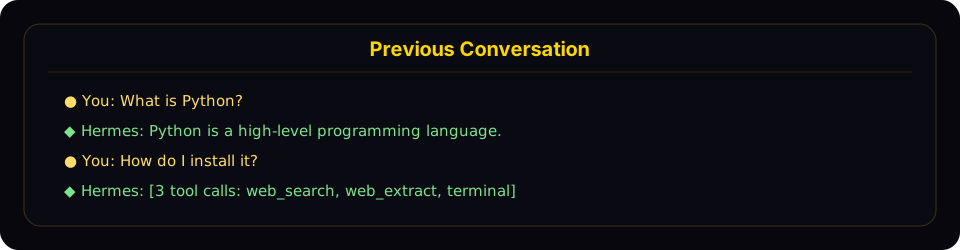
<p className="docs-figure-caption">Resume mode shows a compact recap panel with recent user and assistant turns before returning you to the live prompt.</p>
recap의 동작:
- user messages와 assistant responses를 구분해 표시합니다.
- 긴 message를 truncate합니다(user 300 chars, assistant 200 chars / 3 lines).
- tool calls는
[3 tool calls: terminal, web_search]처럼 count와 tool name으로 collapse합니다. - system messages, tool results, internal reasoning은 숨깁니다.
- 마지막 10 exchanges까지만 표시하고, 이전 내용은
... N earlier messages ...indicator로 보여줍니다. - active conversation과 구분되도록 dim styling을 사용합니다.
recap을 끄고 최소 one-liner behavior를 유지하려면 ~/.hermes/config.yaml에 설정하세요.
display:
  resume_display: minimal   # default: full
Session ID는 YYYYMMDD_HHMMSS_<hex> 형식입니다. CLI/TUI session은 6-character hex suffix를 사용하고(예: 20250305_091523_a1b2c3), gateway session은 8-character suffix를 사용합니다(예: 20250305_091523_a1b2c3d4). full ID나 unique prefix로 resume할 수 있고, title로도 resume할 수 있습니다. -c와 -r 양쪽에서 동작합니다.
Cross-Platform Handoff
CLI session 안에서 /handoff <platform>을 사용하면 live conversation을 messaging platform의 home channel로 넘길 수 있습니다. agent는 CLI에서 멈춘 정확한 지점에서 이어받습니다. 같은 session id, role-aware transcript, tool calls가 모두 유지됩니다.
# Inside a CLI session
/handoff telegram
처리 흐름:
-
CLI가
<platform>이 enabled 상태이고 home channel이 설정되어 있는지 확인합니다. destination chat에서 한 번/sethome을 실행해 설정합니다. -
CLI가 session을 pending으로 mark하고 gateway를 block-poll합니다. agent가 mid-turn이면 거부합니다. 현재 response가 끝날 때까지 기다리세요.
-
gateway watcher가 handoff를 claim하고 destination adapter에 fresh thread를 요청합니다.
- Telegram - new forum topic을 엽니다. Bot API 9.4+ Topics mode가 DM chat에 enabled되어 있으면 DM topic, 아니면 forum supergroup topic을 사용합니다.
- Discord - home text channel 아래에 1440-minute auto-archive thread를 만듭니다.
- Slack - seed message를 post하고 해당
ts를 thread anchor로 사용합니다. - WhatsApp / Signal / Matrix / SMS - native thread가 없으므로 home channel로 fallback합니다.
-
gateway가 destination key를 기존 CLI session id에 re-bind한 뒤, agent에게 confirm과 summarize를 요청하는 synthetic user turn을 만듭니다. reply는 새 thread에 도착합니다.
-
gateway가 success를 acknowledge하면 CLI는
/resumehint를 출력하고 cleanly exit합니다.Handoff complete. The session is now active on telegram.
Resume it on this CLI later with: /resume my-session-title -
이후 conversation은 platform에서 이어집니다. 새 thread에 reply하면 됩니다. 해당 channel에서 authorized된 사용자는 같은 session을 공유하며, thread session key에는
user_id가 없기 때문에 이후 실제 user message도 seamless하게 join됩니다.
Resume back to CLI: desktop으로 돌아오고 싶으면 /resume <title>을 실행하거나 shell에서 hermes -r "<title>"을 실행하면 platform에서 멈춘 지점부터 이어집니다.
Failure modes:
- home channel이 설정되지 않음 - CLI가
/sethomehint와 함께 거부합니다. - platform disabled / gateway not running - CLI가 60초 후 명확한 message와 함께 timeout됩니다. CLI session은 그대로 유지됩니다.
- thread creation 실패(permission, topics-mode off) - home channel로 direct fallback해 handoff 자체는 완료됩니다. thread isolation만 없습니다.
adapter.send실패(rate limit, transient API error) - handoff가 reason과 함께 failed로 표시되고 row가 clear되어 retry할 수 있습니다.
알아둘 limitation: thread-capable이 아닌 platform에서 multi-user group home channel을 쓰면 synthetic turn은 DM-style session key를 사용합니다. typical setup인 self-DM home channel에서는 잘 동작하지만, 진짜 shared group chat에는 이상적이지 않습니다. Telegram / Discord / Slack은 thread가 이를 해결하므로 대부분의 setup은 이 limitation을 만나지 않습니다.
Session Naming
session에 사람이 읽기 쉬운 title을 붙이면 찾고 resume하기 쉽습니다.
Auto-Generated Titles
Hermes는 첫 exchange 이후 각 session에 짧고 descriptive한 title(3-6 words)을 자동 생성합니다. fast auxiliary model을 사용하는 background thread에서 실행되므로 latency를 추가하지 않습니다. auto-generated title은 hermes sessions list나 hermes sessions browse에서 볼 수 있습니다.
auto-titling은 session당 한 번만 실행되며, 사용자가 이미 title을 수동 설정했다면 skip됩니다.
Setting a Title Manually
chat session(CLI 또는 gateway) 안에서 /title slash command를 사용하세요.
/title my research project
title은 즉시 적용됩니다. 아직 database에 session이 생성되기 전, 예를 들어 첫 message를 보내기 전에 /title을 실행했다면 queued 상태로 있다가 session 시작 시 적용됩니다.
기존 session은 command line에서도 rename할 수 있습니다.
hermes sessions rename 20250305_091523_a1b2c3d4 "refactoring auth module"
Title Rules
- Unique - 두 session이 같은 title을 가질 수 없습니다.
- Max 100 characters - listing output이 깨끗하게 유지됩니다.
- Sanitized - control characters, zero-width chars, RTL overrides가 자동으로 제거됩니다.
- Normal Unicode is fine - emoji, CJK, accented characters를 사용할 수 있습니다.
Auto-Lineage on Compression
session context가 수동 /compress 또는 automatic compression으로 압축되면 Hermes는 새 continuation session을 만듭니다. original session에 title이 있으면 새 session은 numbered title을 자동으로 받습니다.
"my project" -> "my project #2" -> "my project #3"
이름으로 resume할 때(hermes -c "my project") lineage에서 가장 최근 session을 자동 선택합니다.
/title in Messaging Platforms
/title command는 모든 gateway platform(Telegram, Discord, Slack, WhatsApp)에서 동작합니다.
/title My Research- session title 설정/title- current title 표시
Session Management Commands
Hermes는 hermes sessions 아래에 session management command set을 제공합니다.
List Sessions
# List recent sessions (default: last 20)
hermes sessions list

# Filter by platform
hermes sessions list --source telegram

# Show more sessions
hermes sessions list --limit 50
session에 title이 있으면 output은 title, preview, relative timestamp를 보여줍니다.
Title                  Preview                                  Last Active   ID
refactoring auth       Help me refactor the auth module please   2h ago        20250305_091523_a
my project #3          Can you check the test failures?          yesterday     20250304_143022_e
weather check          What's the weather in Las Vegas?          3d ago        20250303_101500_f
title이 없는 session만 있으면 더 단순한 format을 사용합니다.
Preview                                            Last Active   Src    ID
Help me refactor the auth module please             2h ago        cli    20250305_091523_a
What's the weather in Las Vegas?                    3d ago        tele   20250303_101500_f
Export Sessions
# Export all sessions to a JSONL file
hermes sessions export backup.jsonl

# Export sessions from a specific platform
hermes sessions export telegram-history.jsonl --source telegram

# Export a single session
hermes sessions export session.jsonl --session-id 20250305_091523_a1b2c3d4
export된 file은 line마다 하나의 JSON object를 포함하며 full session metadata와 모든 messages를 담습니다.
Delete a Session
# Delete a specific session (with confirmation)
hermes sessions delete 20250305_091523_a1b2c3d4

# Delete without confirmation
hermes sessions delete 20250305_091523_a1b2c3d4 --yes
Rename a Session
# Set or change a session's title
hermes sessions rename 20250305_091523_a1b2c3d4 "debugging auth flow"

# Multi-word titles don't need quotes in the CLI
hermes sessions rename 20250305_091523_a1b2c3d4 debugging auth flow
title이 이미 다른 session에서 사용 중이면 error가 표시됩니다.
Prune Old Sessions
# Delete ended sessions older than 90 days (default)
hermes sessions prune

# Custom age threshold
hermes sessions prune --older-than 30

# Only prune sessions from a specific platform
hermes sessions prune --source telegram --older-than 60

# Skip confirmation
hermes sessions prune --older-than 30 --yes
pruning은 ended session만 삭제합니다. ended session은 명시적으로 종료되었거나 auto-reset된 session입니다. active session은 절대 prune되지 않습니다.
Session Statistics
hermes sessions stats
output:
Total sessions: 142
Total messages: 3847
  cli: 89 sessions
  telegram: 38 sessions
  discord: 15 sessions
Database size: 12.4 MB
더 깊은 analytics(token usage, cost estimates, tool breakdown, activity patterns)는 hermes insights를 사용하세요.
Session Search Tool
agent에는 SQLite FTS5 engine으로 과거 conversation 전체를 full-text search하는 built-in session_search tool이 있습니다.
How It Works
- FTS5가 matching messages를 relevance 기준으로 검색합니다.
- 결과를 session별로 group하고 top N unique sessions를 선택합니다. 기본값은 3입니다.
- 각 session conversation을 load하고 match 주변을 중심으로 약 100K chars까지 truncate합니다.
- fast summarization model에 보내 focused summary를 생성합니다.
- metadata와 surrounding context가 포함된 per-session summary를 반환합니다.
FTS5 Query Syntax
standard FTS5 query syntax를 지원합니다.
- Simple keywords:
docker deployment - Phrases:
"exact phrase" - Boolean:
docker OR kubernetes,python NOT java - Prefix:
deploy*
When It's Used
agent는 다음 상황에서 session search를 사용하도록 prompt되어 있습니다.
"When the user references something from a past conversation or you suspect relevant prior context exists, use session_search to recall it before asking them to repeat themselves."
Per-Platform Session Tracking
Gateway Sessions
messaging platform에서 session은 message source에서 만든 deterministic session key로 식별됩니다.
| Chat Type | Default Key Format | Behavior |
|---|---|---|
| Telegram DM | agent:main:telegram:dm:<chat_id> | DM chat마다 session 하나 |
| Discord DM | agent:main:discord:dm:<chat_id> | DM chat마다 session 하나 |
| WhatsApp DM | agent:main:whatsapp:dm:<canonical_identifier> | DM user마다 session 하나. mapping이 있으면 LID/phone alias는 하나의 identity로 collapse됩니다. |
| Group chat | agent:main:<platform>:group:<chat_id>:<user_id> | platform이 user ID를 expose하면 group 안에서 per-user session |
| Group thread/topic | agent:main:<platform>:group:<chat_id>:<thread_id> | thread participants가 공유하는 session이 기본값입니다. thread_sessions_per_user: true이면 per-user입니다. |
| Channel | agent:main:<platform>:channel:<chat_id>:<user_id> | platform이 user ID를 expose하면 channel 안에서 per-user session |
Hermes가 shared chat의 participant identifier를 얻을 수 없으면 해당 room의 shared session 하나로 fallback합니다.
Shared vs Isolated Group Sessions
기본적으로 Hermes는 config.yaml에서 group_sessions_per_user: true를 사용합니다. 즉:
- Alice와 Bob은 같은 Discord channel에서 Hermes와 대화해도 transcript history를 공유하지 않습니다.
- 한 사용자의 길고 tool-heavy한 task가 다른 사용자의 context window를 오염시키지 않습니다.
- running-agent key가 isolated session key와 일치하므로 interrupt handling도 per-user로 유지됩니다.
하나의 shared "room brain"을 원한다면 다음을 설정하세요.
group_sessions_per_user: false
그러면 groups/channels가 room당 single shared session으로 돌아갑니다. shared conversational context는 유지되지만 token costs, interrupt state, context growth도 공유됩니다.
Session Reset Policies
gateway session은 configurable policy에 따라 자동 reset됩니다.
- idle - N분 inactivity 후 reset
- daily - 매일 특정 hour에 reset
- both - idle 또는 daily 중 먼저 오는 조건으로 reset
- none - auto-reset하지 않음
session이 auto-reset되기 전, agent에게 conversation에서 중요한 memory나 skill을 저장할 turn이 주어집니다.
active background process가 있는 session은 policy와 무관하게 auto-reset되지 않습니다.
Storage Locations
| What | Path | Description |
|---|---|---|
| SQLite database | ~/.hermes/state.db | FTS5가 포함된 모든 session metadata + messages |
| Gateway transcripts | ~/.hermes/sessions/ | session별 JSONL transcripts + sessions.json index |
| Gateway index | ~/.hermes/sessions/sessions.json | session keys를 active session IDs에 map |
SQLite database는 concurrent readers와 single writer에 적합한 WAL mode를 사용합니다. 이는 gateway의 multi-platform architecture에 잘 맞습니다.
Database Schema
state.db의 주요 table:
- sessions - session metadata(id, source, user_id, model, title, timestamps, token counts). title에는 unique index가 있습니다. NULL title은 허용되고 non-NULL title만 unique해야 합니다.
- messages - full message history(role, content, tool_calls, tool_name, token_count)
- messages_fts - message content full-text search용 FTS5 virtual table
Session Expiry and Cleanup
Automatic Cleanup
- gateway session은 configured reset policy에 따라 auto-reset됩니다.
- reset 전에 agent는 expiring session에서 memory와 skill을 저장합니다.
- opt-in auto-pruning:
sessions.auto_prune이true이면 CLI/gateway startup 때sessions.retention_days(기본 90)보다 오래된 ended session이 prune됩니다. - 실제로 row를 제거한 prune 후에는 disk space를 회수하기 위해
state.db에VACUUM을 실행합니다. SQLite는 plain DELETE만으로 file size를 줄이지 않습니다. - pruning은
sessions.min_interval_hours(기본 24)마다 최대 한 번 실행됩니다. last-run timestamp는state.db내부에 저장되므로 같은HERMES_HOME을 쓰는 모든 Hermes process가 공유합니다.
기본값은 off입니다. session history는 session_search recall에 중요하고, 조용히 삭제되면 사용자가 놀랄 수 있기 때문입니다. enable하려면 ~/.hermes/config.yaml에 설정하세요.
sessions:
  auto_prune: true          # opt in - default is false
  retention_days: 90        # keep ended sessions this many days
  vacuum_after_prune: true  # reclaim disk space after a pruning sweep
  min_interval_hours: 24    # don't re-run the sweep more often than this
active session은 age와 무관하게 auto-prune되지 않습니다.
Manual Cleanup
# Prune sessions older than 90 days
hermes sessions prune

# Delete a specific session
hermes sessions delete <session_id>

# Export before pruning (backup)
hermes sessions export backup.jsonl
hermes sessions prune --older-than 30 --yes
database는 천천히 커집니다. 보통 수백 sessions에 10-15 MB 정도이며, session history는 past conversation을 recall하는 session_search의 기반입니다. 그래서 auto-prune은 기본 disabled입니다. heavy gateway/cron workload에서 state.db가 성능에 의미 있게 영향을 줄 때 enable하세요. 관찰된 failure mode는 약 1000 sessions와 384 MB state.db로 인해 FTS5 insert와 /resume listing이 느려진 사례입니다. 자동 sweep을 켜지 않고 일회성 cleanup만 하려면 hermes sessions prune을 사용하세요.